

In this guide, we’ll explore the best AI tools in 2026 for students, highlighting their key features, benefits, and how they can make learning faster, easier, and more enjoyable.
Artificial Intelligence (AI) is transforming education like never before. In 2026, students will have access to smarter tools that can help them write assignments, solve mathematical problems, summarize lengthy notes, prepare presentations, learn programming, and manage their study schedules more efficiently. Whether you’re a high school student, college learner, or university researcher, AI tools can save time and improve your academic performance.
Why Students Should Use Best AI Tools in 2026
AI has become an essential part of modern education. Instead of spending hours searching for information or organizing notes, students can use AI-powered platforms to automate repetitive tasks and focus on understanding concepts.
Some major benefits include:
- Faster research
- Better writing assistance
- Personalized learning
- Instant homework support
- Improved productivity
- Enhanced creativity
- Efficient time management
However, students should always use AI responsibly. AI should support learning—not replace critical thinking or original work.
1. ChatGPT – The Ultimate AI Study Assistant
ChatGPT remains one of the most powerful AI tools available in 2026. It acts as a personal tutor capable of explaining complex concepts in simple language.

Key Features
- Explains difficult topics
- Solves coding problems
- Generates study notes
- Helps with essay writing
- Summarizes long articles
- Creates quizzes for revision
- Assists in brainstorming project ideas
Best For
- Homework
- Programming
- English writing
- Research assistance
- Exam preparation
Students can ask follow-up questions until they completely understand a topic, making learning more interactive than traditional search engines.
2. Google Gemini
Google Gemini has evolved into one of the smartest AI assistants for students. Its deep integration with Google Workspace makes it an excellent productivity companion.

Key Features
- Research assistance
- Email writing
- Document summarization
- Spreadsheet analysis
- Presentation creation
- Smart search capabilities
Best For
- Research projects
- Classroom assignments
- Collaboration
- Presentation preparation
Gemini works seamlessly with Google Docs, Sheets, and Slides, helping students complete assignments faster.
3. Microsoft Copilot
Microsoft Copilot has become an essential AI companion for students using Microsoft Office.

Key Features
- Creates PowerPoint presentations
- Writes Word documents
- Generates Excel formulas
- Summarizes PDFs
- Organizes study material
Best For
- Office productivity
- Reports
- Presentations
- Academic documentation
Students who regularly use Microsoft Word and PowerPoint can significantly reduce the time needed to prepare assignments.
4. Grammarly AI
Excellent writing is essential for academic success. Grammarly AI helps students improve grammar, clarity, vocabulary, punctuation, and tone.

Key Features
- Grammar correction
- Sentence rewriting
- Plagiarism checking
- AI writing suggestions
- Tone detection
Best For
- Essays
- Research papers
- Emails
- Reports
Rather than simply correcting mistakes, Grammarly explains why changes are needed, helping students become better writers over time.
5. Notion AI
Notion AI combines note-taking, project management, and AI assistance into one platform.

Key Features
- AI-generated notes
- Lecture summaries
- Study planners
- Task management
- Knowledge organization
Best For
- Daily planning
- Class notes
- Group projects
- Revision schedules
Students can keep all their academic resources organized in one place while using AI to generate summaries and study plans.
6. Perplexity AI
Perplexity AI is quickly becoming a favorite among students because it provides direct answers with references and source citations.

Key Features
- AI-powered research
- Source citations
- Quick summaries
- Fact-based answers
- Web research assistance
Best For
- Research papers
- Literature reviews
- Academic references
Unlike traditional search engines, Perplexity delivers concise answers while pointing users to the sources for verification.
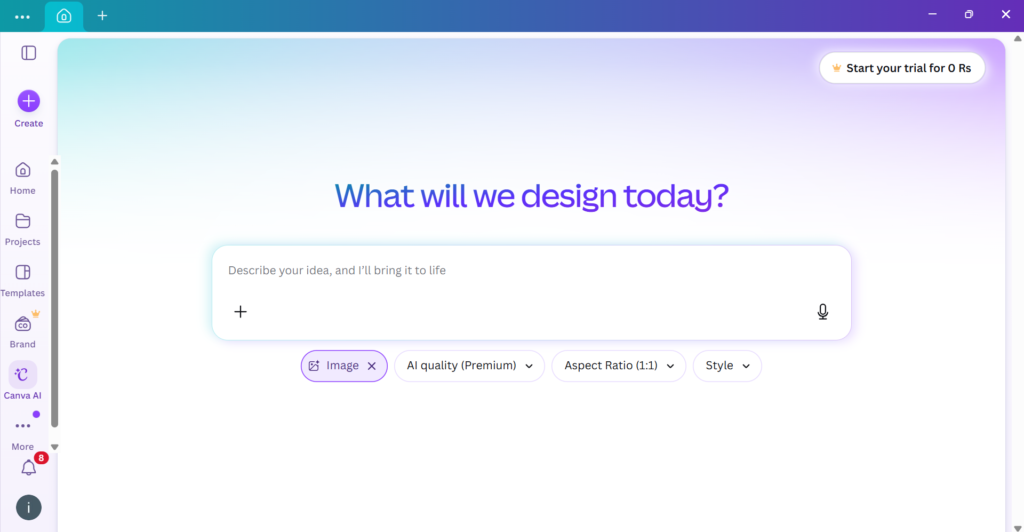
7. Canva AI
Creating attractive presentations has never been easier. Canva AI allows students to design professional-looking slides, posters, infographics, and social media graphics within minutes.
Key Features
- AI presentation generator
- Image creation
- Poster design
- Infographics
- Resume templates
Best For
- School presentations
- University projects
- Posters
- Visual assignments
Students with no design experience can create visually impressive academic projects using Canva AI.
Also Read: The Metaverse 2.0: Beyond Gaming and Into Real-World Applications

How to Choose the Right AI Tool
Not every AI tool serves the same purpose. The best choice depends on your academic needs.
- Need help with writing? Choose Grammarly AI.
- Need coding assistance? Use ChatGPT.
- Need research support? Try Perplexity AI.
- Need presentations? Canva AI or Microsoft Copilot.
- Need organization? Notion AI is ideal.
Many students combine multiple AI tools to maximize productivity and improve learning outcomes.
Also Read: Pyramid of Egypt: The Hidden Chamber Inside the Great Pyramid